
What SLAtech Vantage is
SLAtech Vantage is an AI-powered client portal for software projects. It connects project tasks, time entries, conversations, code activity, and monitoring so clients and agencies can see what's happening without compiling another report. Ask a question in plain words and get an answer that shows the sources it was built from.
Connects to the tools you already use
- Freshservice
- Jira
- Azure DevOps
- Trello
- Asana
- ClickUp
- Linear
- GitHub
- GitHub Actions
- GitLab
- Bitbucket
- Sentry
- Rollbar
- Bugsnag
- Gmail
- Microsoft 365
- Slack
- Telegram
- Toggl Track
- Clockify
This is not a closed list. Integrations are built on the vendors' APIs, and if you need one we do not support yet, we can scope it as part of the implementation.
Client reporting shouldn't take time away from client work
The information your clients ask for already exists across your tools. The problem is turning that activity into a clear client-facing view.
Where did the hours go?
A fair question. The answer already exists in your systems, but pulling it together manually takes time.
We see no progress
The project moved. If clients can't see it, they'll ask for updates.
Can we get a report?
Another report your team has to prepare instead of doing billable work, every month.
What your clients see
What's on these screens comes from the work already recorded, not from a report someone writes at month end.
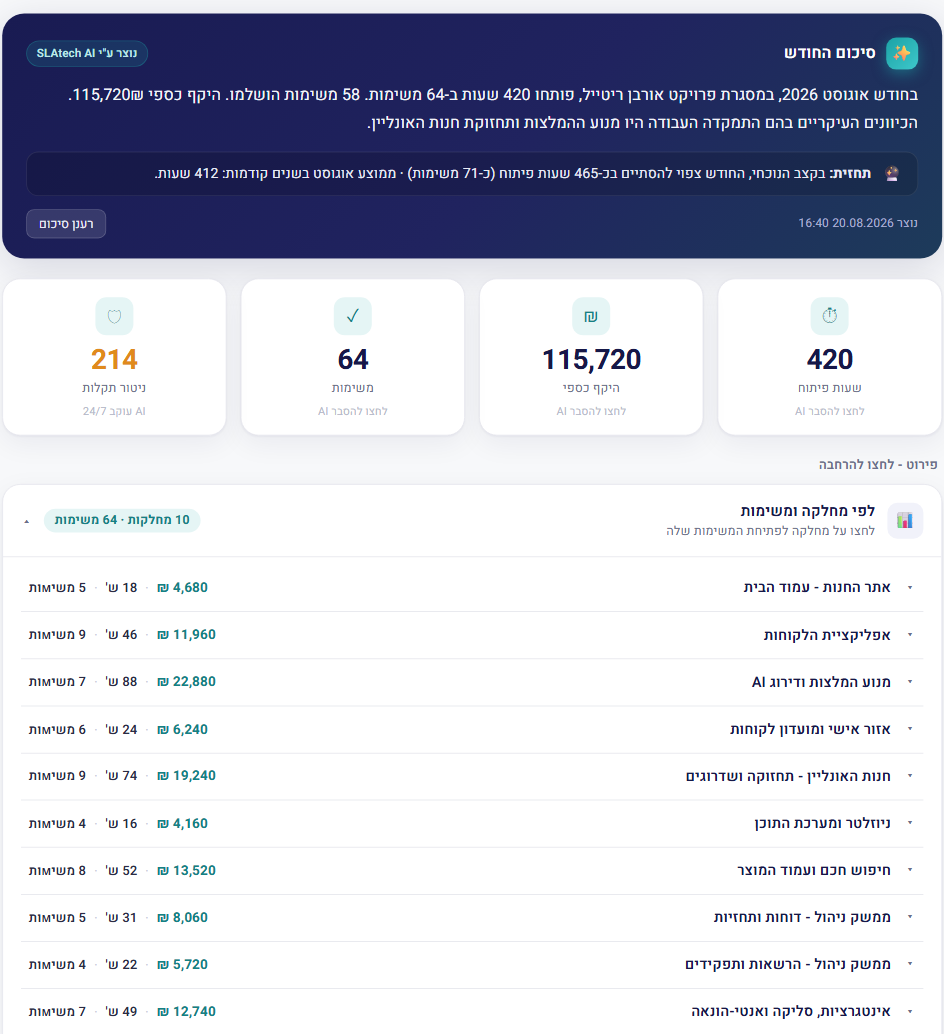
Project activity
Clients can check progress without asking your team for an update.
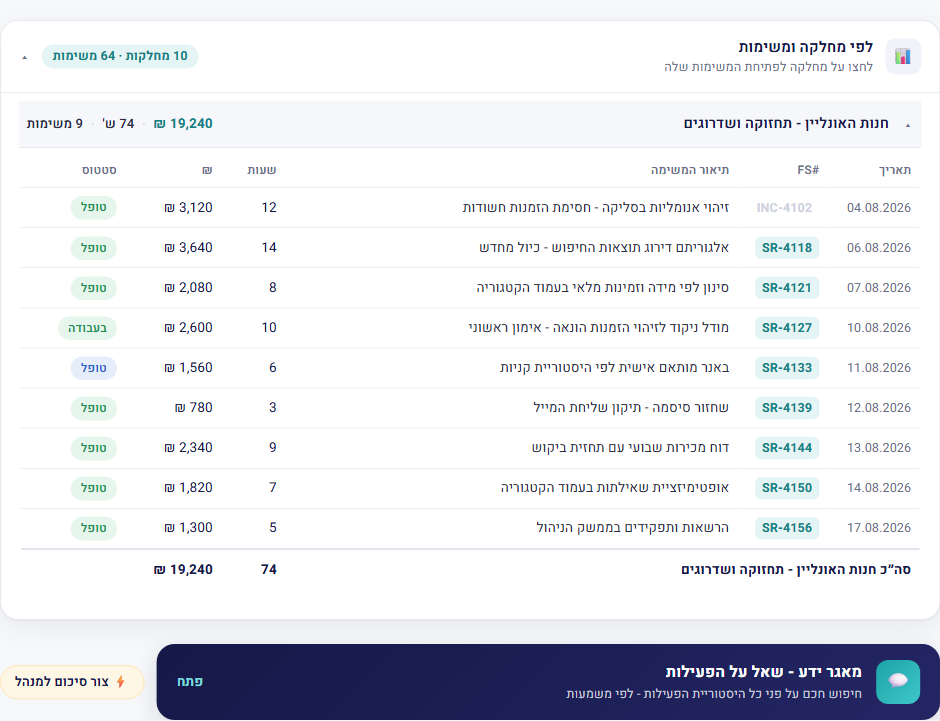
Hour → task → monthly report
Clients open a task in the report and see the time entries behind it.
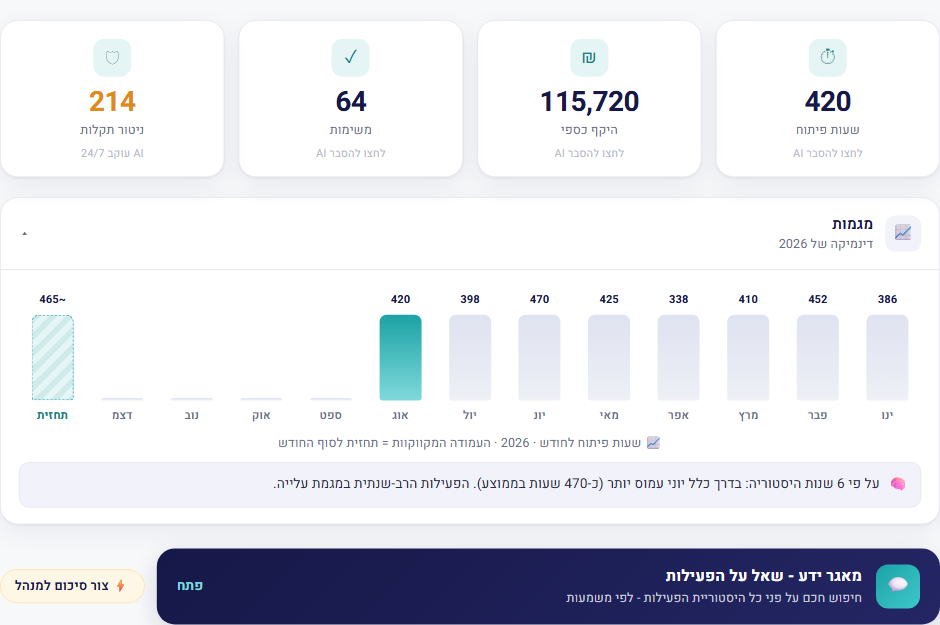
Trends and forecast
Clients can see spending trends before the end of the month. If there's an overrun, you and the client are looking at the same numbers.
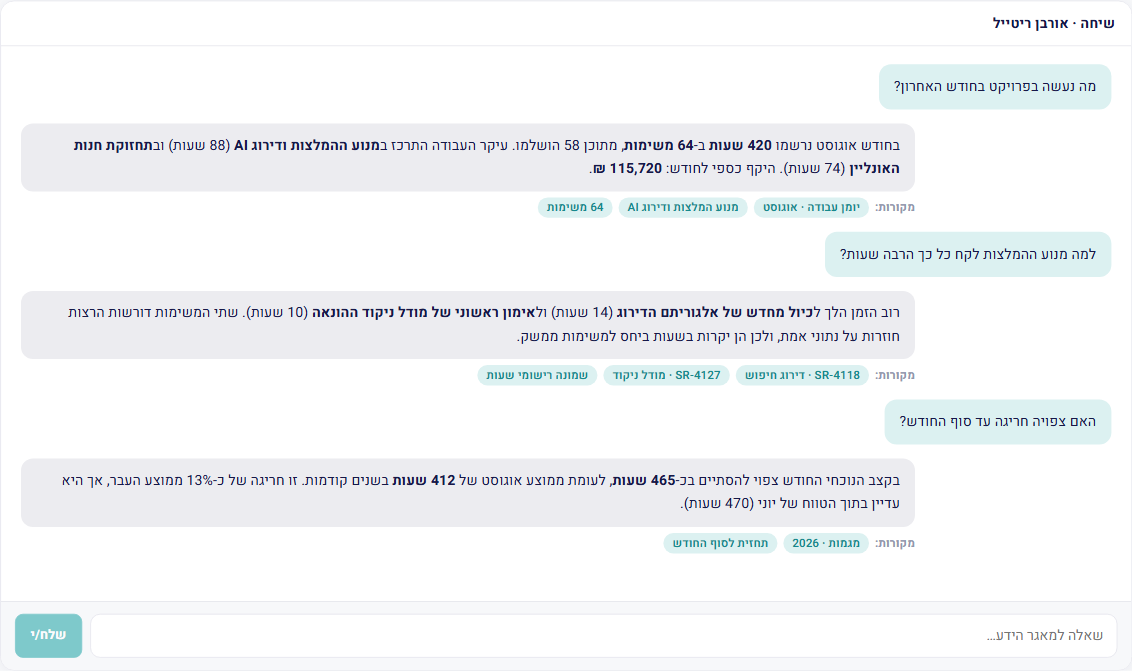
Ask in plain words
Clients get answers without interrupting your team.
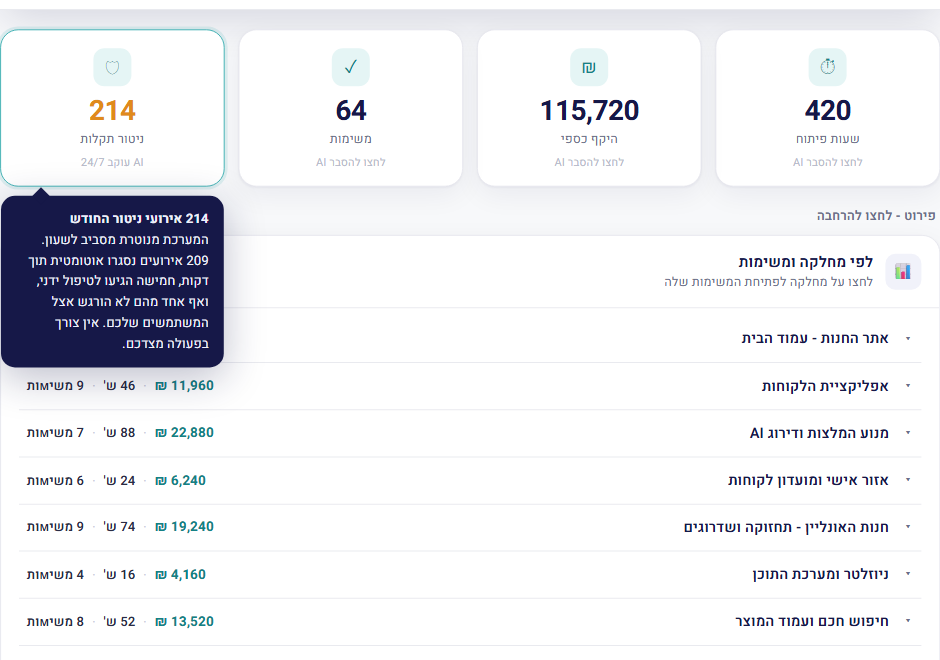
Trace every number to its source
Clients click a number and see the records behind it. Monitoring data is available to them here too.
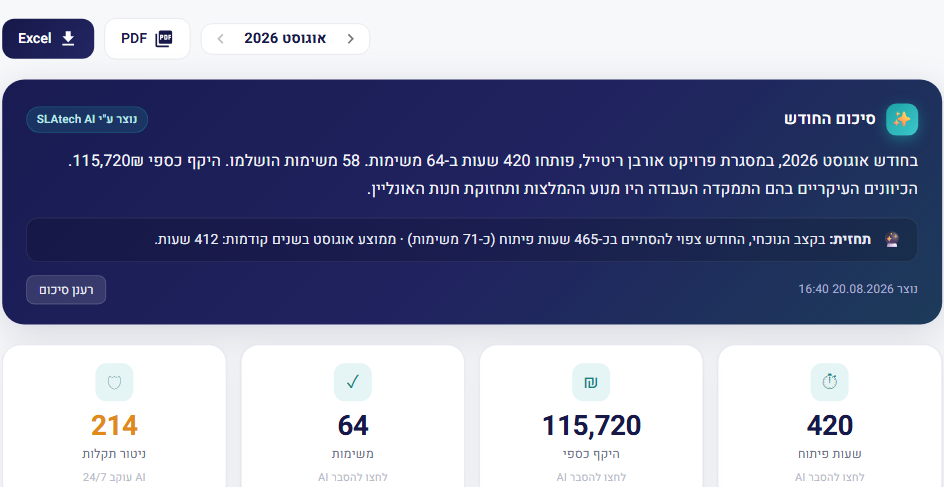
Export project reports
The monthly report is already there, and your client downloads it themselves.
Less reporting. More time for development
The data comes from the tools you already work in, and the monthly report is not something anyone assembles by hand.
Client updates without the reporting
Clients see what was done and when
Makes your work visible
Give clients a clear view of the work your team is already doing, including the parts that never show up in a deliverable.
From a spec to a proposal
Upload the spec, a client enquiry or a full document, and it comes back broken into modules with an hour range for each. You correct it, add your own terms and send it out.
Monitoring and alerts
See incidents and system trends before your client does.
Project history and knowledge
See what was agreed, when, and why, even years later and even if the person who knew has left.
Privacy by design
Each client can access only their own project, and personal information is replaced with labels before content is sent to the AI model.
Automatic project summaries
SLAtech Vantage assembles the monthly summary from tasks, time entries, and events. Nobody on your team writes it.
Forecast to month end
Forecast month-end hours based on the current pace, with a comparison to previous months.
Recurring issues and previous fixes
SLAtech Vantage identifies an incident that has come back and shows what resolved it last time.
SLAtech Vantage connects to your systems through their APIs. If you need an integration or module we don't support yet, we can scope it as part of the implementation.
Tell us what you needLet clients answer routine project questions themselves
A question in plain words, and an answer built from the work already recorded. You can see which sources it was built from.
Control exactly what each client can see
Clients see only the project data you choose to expose. Internal notes, costs, margins, and team discussions stay private by default, and other client projects remain isolated.
Your client sees
- Tasks, statuses, and what was delivered
- The hours you put on the invoice
- System health and the incident history
- Project knowledge: what was solved and how, open to the client as much as to you
Private by default
- Internal notes and drafts on tasks
- Rates, cost, and the margin on the project
- Internal discussion and your team's threads
- Other client projects, which remain isolated
What is internal stays internal: working notes, threads between your own people, and other clients' data. The client sees what belongs to their project.
What reaches you about failures, and in what order
An alert goes out once per failure, and the list itself is ordered by what needs attention first.
One alert per incident, with another only if it returns
Each project can have one email address for specifications received from the client and another for production incident alerts. Each address can use its own language.
A new incident generates one alert. Additional occurrences of the same incident increase its counter instead of generating more email. If the incident is resolved and later returns, a new alert is sent.
Different incidents remain separate. If forty different incidents occur, the system can send forty separate alerts because each one requires attention.
Automatically prioritize incidents that need attention
Each incident is prioritized based on how often it occurs, the type of error, whether it returned after being resolved, and when it was last detected.
Issues caused by external services are not automatically pushed to the top of the list, while noise from bots and scanners is kept from being promoted. If an incident has not occurred for three days, its automatic priority is reduced.
Priority can also be set manually. A manual setting overrides the automatic priority and remains in place.
You could build it. But then you have to maintain it
A client portal isn't just a dashboard. You have to connect the data sources, maintain integrations, manage access rules, isolate client data, keep reports working, and adapt as your internal tools change.
Build internally
- Connect every system separately, and absorb every vendor change yourself
- A plain-English question layer, plus the access rules that keep client data isolated
- Monitoring, alerts, and a history you have to store and search
- Then maintain all of it while your team ships client work
Use SLAtech Vantage
- The systems you already use get connected, not rebuilt
- Client isolation and PII filtering are built in from the start
- Monitoring and history work from day one
- We maintain the platform and integrations so your team stays focused on client work
Pricing based on your setup
Every agency has a different combination of tools, projects, historical data, and requirements. SLAtech Vantage is scoped around your actual implementation rather than priced per seat.
What you can include
Every implementation includes the client portal, plain-English Q&A, and PII filtering. Add the modules your projects require.
Connects to what you have
- Your task tracker
- Your mailbox
- Your repository
- Historical data import
- Your messaging tools
- Your branding
- WhatsApp threads
- Client requests, properly worded
What was done
- Tasks and backlog
- Time tracking
- Task discussion
- Periodic reports
- Project email
- Files and attachments
- Commits and code
- Spec broken into modules
- Work planning
Time and billing
- Where the hours went
- Hour → task → monthly report
- Invoicing
- Accounting integration
- Client proposals
- Hour range per module
- Your standard terms
- Shareable proposal link
- Proposal status
- Your currency and VAT
- Gaps the spec didn't cover
- Purchase orders matched to hours
- Your client's legal entities
- Client details in the quote and PDF
- Monthly ceiling per task
Monitoring and alerts
- Error monitoring
- Identical incidents merged
- Regressions: bugs that came back
- Alerts
- Incident history
- Area names, not module names
Project history and knowledge
- Search the history
- Project history
- Knowledge base
- Monthly summary
Team and permissions
- Who works on the project
- Communication analysis
- Who sees what
- Project involvement
The data stays yours
- Client isolation
- Access log
You only pay for the modules included in your implementation.
What affects the scope
Pricing depends on four things, not seat count.
- Integrations The systems SLAtech Vantage needs to connect to. Two or seven is a real difference in implementation work.
- Historical data How much existing project history needs to be available. This affects the initial processing, not the ongoing run.
- Number of projects One project to start with, or your whole client portfolio.
- Selected modules Monitoring, branding, permissions, client isolation, and whatever else you choose to include.
Privacy by design
Each client can access only their own project. Before a question is sent to the AI model, personal information such as names, ID numbers, phone numbers, and email addresses is replaced with labels. Access is passwordless, using a one-time sign-in code.
From a spec to a proposal, the same day
Upload the spec, a client enquiry or a full document, and it comes back broken into modules, each with a type of work and an hour range. The range is a draft to edit, not a prediction. You correct what needs correcting, and your corrections are kept.
The proposal carries your hourly rate, your currency and VAT, and the terms you already work by: payment schedule, how long the offer stands, handover of the code.
- Broken down by module, not one number for everything
- Assumptions the spec doesn't cover, written out
- Your own coefficient for working with AI, per type of work
- A PDF to download or a link to share
What happens before the deal already lives in the system
The enquiry, the spec, the correspondence and the prospect record sit in the same place where the work will run once the contract is signed.
Start managing a project before the contract is signed
A project can be created while it is still in the negotiation stage, before any actual work begins. There are no work logs or billable hours at this stage, but email and messaging can already be connected so all communication with the prospective client stays in one place.
Other integrations, including task management systems, code repositories, and monitoring tools, become available when the project moves into active work. The specification and proposal remain in the same project, so nothing needs to be transferred or recreated after the contract is signed.
One company record, without duplicates
Each company has a single record in the system. Your relationship with that company, including contacts, language preferences, and notes, is stored separately.
Before a new company record is created, the system checks whether the company already exists. If a match is found, only public information is shown: company name, registration number, and address. This helps prevent duplicate records without revealing who works with the company or exposing internal information.
Keep real contacts separate from shared and automated senders
SLAtech Vantage collects contacts from project communications and distinguishes between people, shared or service mailboxes, and automated senders.
This keeps noreply addresses and shared inboxes from cluttering the contact list and makes it easier to find the people involved in a project. Classification is based on the sender name and email address and can be corrected manually at any time.
Send project notifications in each recipient language
Each user can have a preferred language: Hebrew, English, or Russian. Outgoing messages, including project invitations, specification notifications, and incident alerts, are generated in the recipient selected language.
A language is also assigned to each client record and is used for proposals. This allows project participants to receive information in the language that works for them without relying on manual translation.
Why this was built
Years of client work, the easy clients and the difficult ones. The time never went into the development itself. It went into everything around it: pulling together what was done this month, explaining again where the hours went, assembling the report, putting out a quote.
A tool like this gets built out of the daily need first, so that every client, demanding or not, is handled the same way, without the routine and without the endless explaining. Now it's open to anyone who works like this.
Frequently asked questions
What exactly does the client see about hours?
Will they see our rates and our costs?
Do we have to replace the tools we work with?
What will we have to write or fill in by hand?
Can one client see another client's project?
Can we start with a single project?
Is pricing based on users?
Can you build an integration we need?
Each module explained on its own page
Every module has a page of its own: what it does, where the data comes from and how much of it the client sees. Read only what matters to you.
Tasks that open themselves
Some teams manage tasks; others type them in.
Open the module pageThe customer signs in and sees their own month
In most working systems the customer signs in nowhere.
Open the module pageCustomer correspondence inside the project, not only in a mailbox
Correspondence with the customer is the largest part of a project that the project itself knows nothing about.
Open the module pageFind what was agreed in messaging, when the decision never reached email
A large share of the decisions on a project are made in conversation, not in a document.
Open the module pageError monitoring for a server that reports hundreds of thousands of errors
A live production server produces errors continuously.
Open the module pageKnow who you are working with on every project
Two years into a project there are dozens of people in it, and nobody typed a single one of them anywhere.
Open the module pageThree journals: what we touched, what you did, and what we warned about
A contractor working with a customer's data should be able to show exactly what they touched.
Open the module pageKnowledge base software for work you have already done once
Whoever fixed it knows the fix.
Open the module pageWhat each plan includes and what it costs - on the pricing page
Give your clients visibility without adding another reporting workflow
Tell us about your agency, the tools you use, and what you want your clients to see. We'll review the setup and get back to you within one business day.
- We review which systems you already use
- We show how a real project of yours would look
- We propose an implementation scope and pricing in writing