
What SLAtech Vantage is
SLAtech Vantage is an AI-powered client portal for software projects. It connects project tasks, time entries, conversations, code activity, and monitoring so clients and agencies can see what's happening without compiling another report. Ask a question in plain words and get an answer that shows the sources it was built from.
Connects to the tools you already use
- Freshservice
- Jira
- Azure DevOps
- Trello
- Asana
- ClickUp
- Linear
- GitHub
- GitHub Actions
- GitLab
- Bitbucket
- Sentry
- Rollbar
- Bugsnag
- Gmail
- Microsoft 365
- Slack
- Telegram
- Toggl Track
- Clockify
This is not a closed list. Integrations are built on the vendors' APIs, and if you need one we do not support yet, we can scope it as part of the implementation.
Get the project status without chasing anyone for an update
The information you need usually already exists. It is just spread across task trackers, time logs, repositories, email, and monitoring tools. You've probably heard some version of these before:
We're on it
No timeline, no clear ownership, and no way to verify the status.
Just trust us
You shouldn't have to rely on a verbal status update. SLAtech Vantage gives you the underlying records instead.
It's technically complex
You should be able to get a clear answer without deciphering technical jargon.
See what SLAtech Vantage gives you
Follow project activity, see what the hours were logged for, track trends, trace numbers back to their source, export reports, and ask questions about your project in plain words.
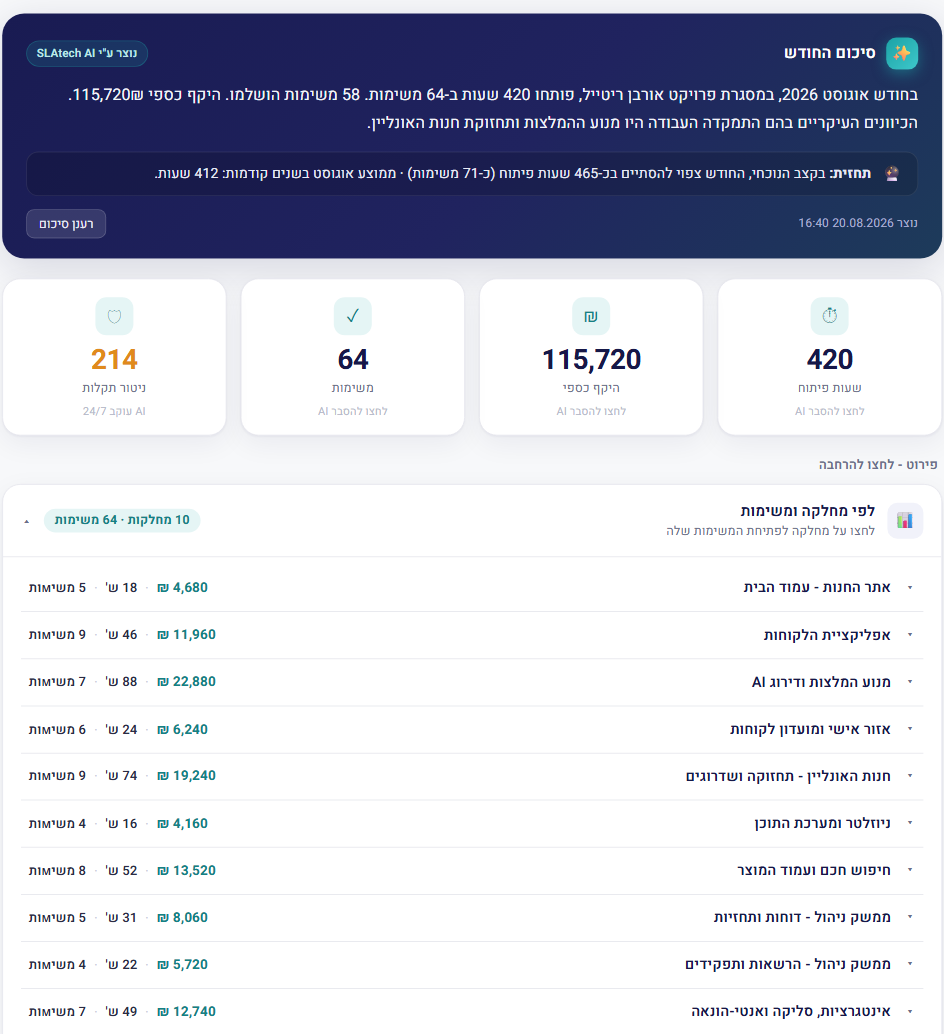
Project activity
See tasks, time entries, and monitoring events in one chronological view. No jumping between three different tools just to understand what happened this week.
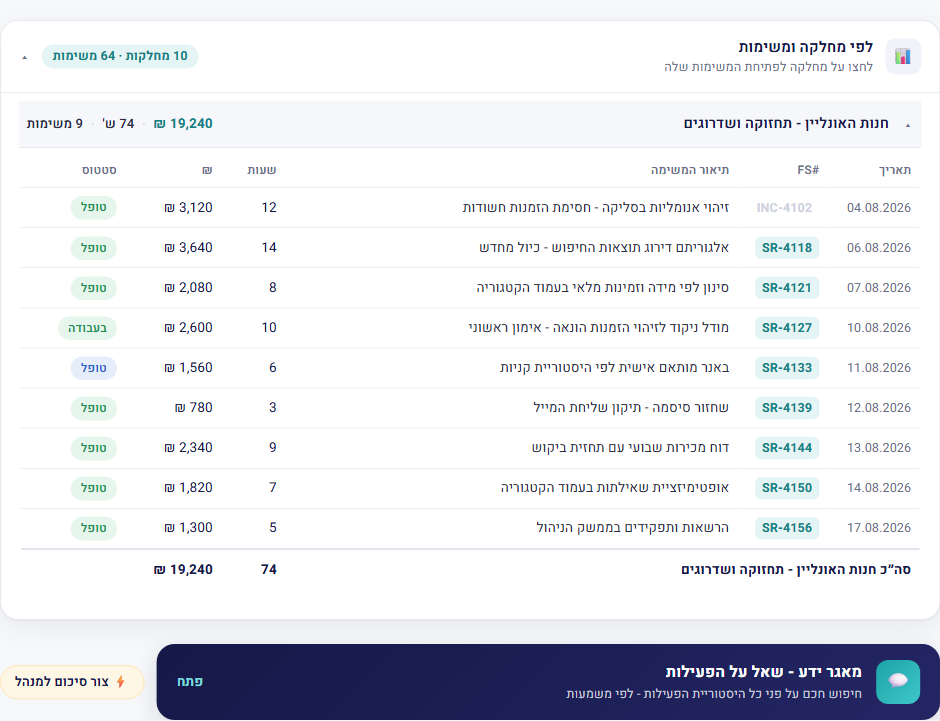
Hour → task → monthly report
Open a task in the report and see the time entries behind it.
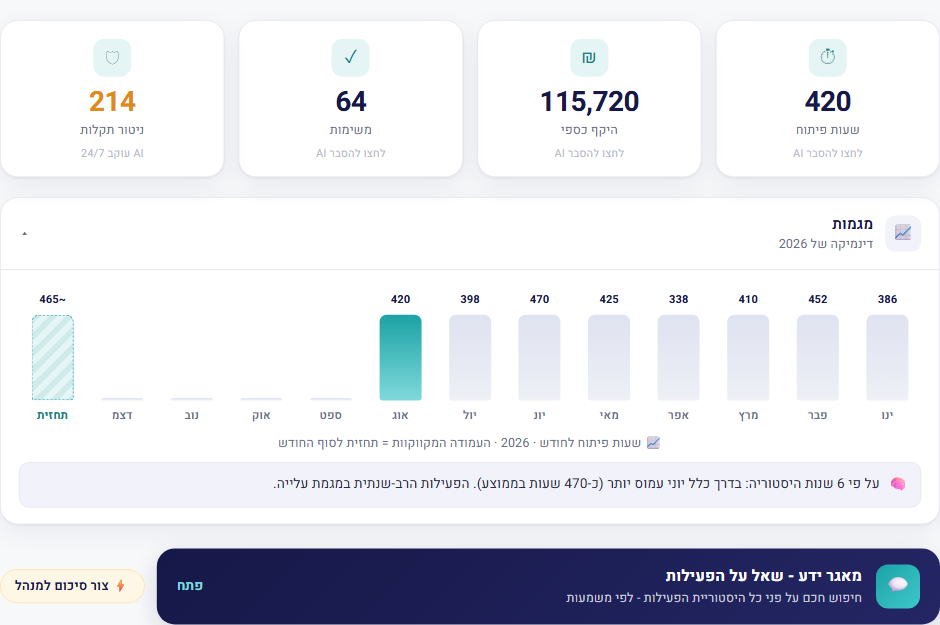
Trends and forecast
Track monthly hours and see where the current month is heading, based on activity already recorded on the project.
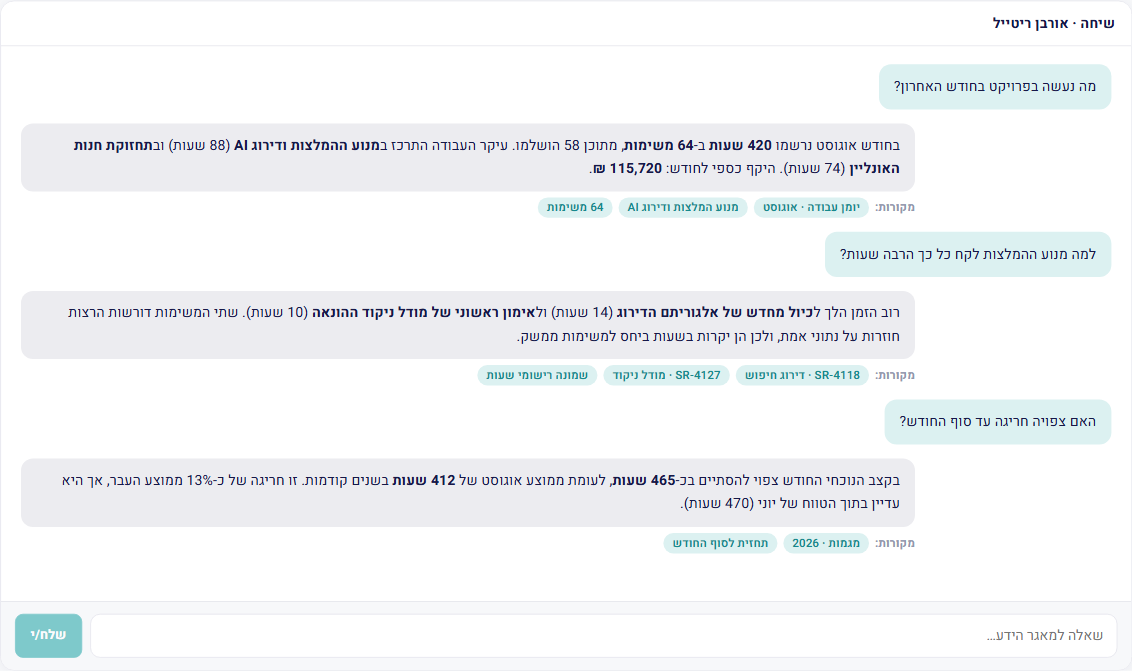
Ask in plain words
Ask in plain words and get an answer, with the sources it was built from.
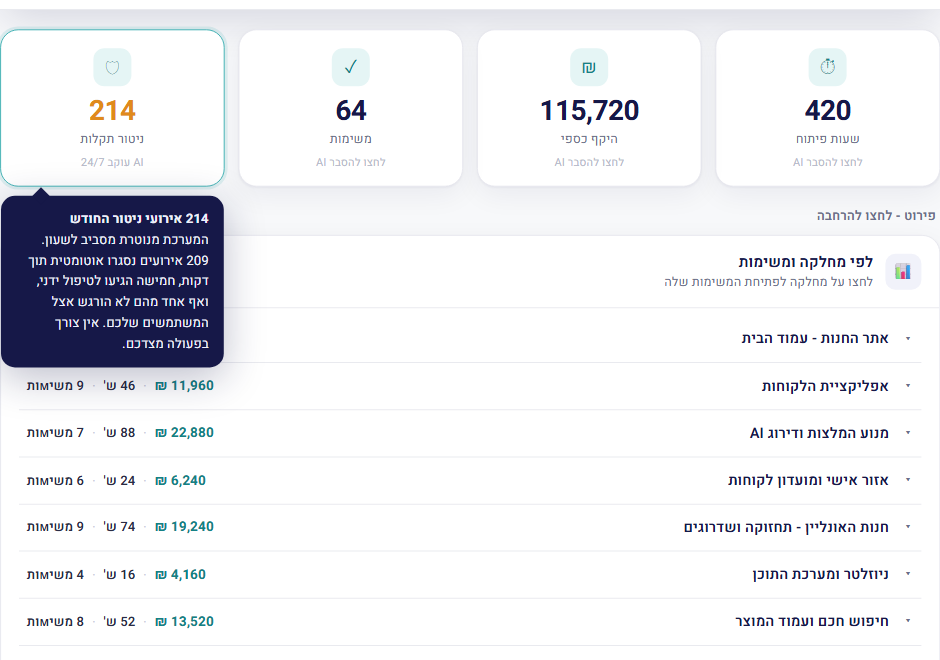
Trace every number to its source
Click a number to see the underlying task or time entry. Round-the-clock monitoring data is available here too.
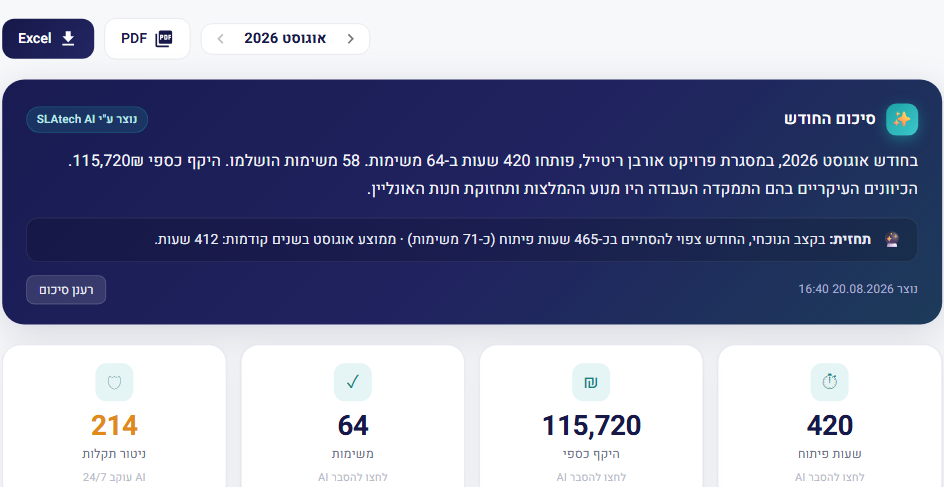
Export project reports
Export the same project data to PDF or Excel. No separate spreadsheet to rebuild or reconcile.
Everything you need to understand the project
SLAtech Vantage brings project activity, system health, and spend together in one view, so you don't have to work across your development team's tools yourself.
Project activity
What was done and when, from the record itself
System health
Track incidents, anomalies, recurring issues, and system trends, so issues can be addressed before your users start reporting them.
Budget and billing
Every hour is tied to a task, and you can see exactly what it was logged for.
SLAtech Vantage is designed to work with the tools you already use, connecting through their APIs. If you need an integration we don't support yet, we can scope it as part of the implementation.
Tell us what you needPut a request together without writing a spec
Describe what you need in your own words. It comes back as a clear document, along with a list of what's missing: what wasn't said, what could be read two ways, what will come up later anyway. Answer what's relevant and the document updates.
The request is kept in the project and reaches whoever is doing the work. You can attach screens, sketches or a link to a mockup, and you can revise the request after sending it.
- Write freely, no form to fill in
- Questions about the gaps, not guesses
- Attach screens and images
- Versions: what changed and when
Ask about your project in plain words
The client asks in plain words, and the answer comes from the work itself. You can see which sources it was built from.
A task board shows the plan. SLAtech Vantage shows what happened
A task tracker is built for the team doing the work, and how accurate it is depends on how consistently the team updates it. A client-facing view has to stay accurate even when nobody remembers.
Built from your project data
The information comes from tasks, time entries, and monitoring, not from a separate report somebody has to prepare.
You see where it came from
Every answer shows which sources it was built from, and each one opens right there.
Everything in one place
Project activity, system health, and spend sit together. No jumping between three different tools to understand where things stand.
Stays current automatically
You're not relying on someone to remember to update another dashboard. The data comes from the systems where the work is already recorded.
Privacy by design
Each client can access only their own project. Before a question is sent to the AI model, personal information such as names, ID numbers, phone numbers, and email addresses is replaced with labels. Access is passwordless, using a one-time sign-in code.
Clients can see what happens to their project data
The access log gives clients direct visibility into actions involving their project data: what was changed, which files were downloaded, which reports were exported, and which links were opened for viewing.
The log covers actions performed by every organization working on the project, including subcontractors. Regular page views and automated background processes are not recorded, and the system clearly states what is and is not included in the log.
Send project notifications in each recipient language
Each user can have a preferred language: Hebrew, English, or Russian. Outgoing messages, including project invitations, specification notifications, and incident alerts, are generated in the recipient selected language.
A language is also assigned to each client record and is used for proposals. This allows project participants to receive information in the language that works for them without relying on manual translation.
Frequently asked questions
Does our development team have to update SLAtech Vantage manually?
Where does the information come from?
What do you need from us to start?
Does our data go to an external AI model?
What happens if SLAtech Vantage can't find the answer?
Does this replace meetings with our development team?
How long does implementation take?
What if our development team doesn't want to connect?
Each module explained on its own page
Every module has a page of its own: what it does, where the data comes from and how much of it the client sees. Read only what matters to you.
The customer signs in and sees their own month
In most working systems the customer signs in nowhere.
Open the module pageThree journals: what we touched, what you did, and what we warned about
A contractor working with a customer's data should be able to show exactly what they touched.
Open the module pageTasks that open themselves
Some teams manage tasks; others type them in.
Open the module pageCustomer correspondence inside the project, not only in a mailbox
Correspondence with the customer is the largest part of a project that the project itself knows nothing about.
Open the module pageFind what was agreed in messaging, when the decision never reached email
A large share of the decisions on a project are made in conversation, not in a document.
Open the module pageKnow who you are working with on every project
Two years into a project there are dozens of people in it, and nobody typed a single one of them anywhere.
Open the module pageError monitoring for a server that reports hundreds of thousands of errors
A live production server produces errors continuously.
Open the module pageKnowledge base software for work you have already done once
Whoever fixed it knows the fix.
Open the module pageWhat each plan includes and what it costs - on the pricing page
See how SLAtech Vantage would work with your project
Tell us a little about your current setup. We'll review it and get back to you within one business day, with no commitment and no hour-long presentation.
- We review which systems you already use
- We show how your project would look in SLAtech Vantage
- We explain what's needed from you, usually very little